


Apple’s attitude towards OS X security has always been a bit equivocal. On a technical level, it has done a good job. OS X out of the box is reasonably secure and Apple keeps it that way with regular, usually monthly, updates.
 But Apple’s marketers have long seen the Mac’s perceived security edge over Windows as a competitive advantage, which leads them to disparage the idea that Mac owners need to much to protect their systems. This worked for a long time mostly because Windows presented the bad guys with so much greater a target of opportunity that few attacks targeted Macs. (In fact, the inherent security of OS X and windows have been pretty much even since the launch of Windows Vista.)
But the surge in the popularity of Apple products makes Macs a much more tempting target and with Max OAS X Mountain Lion, Apple is moving to get ahead of the problem. One of the new features in the OS is Gatekeeper, an optional whitelisting approach that should help keep the unwary from loading bad applications onto their Macs. Apps (and their cousins, browser plug-ins) rather than the operating system itself have become the leading vector of attacks since the quality of app code varies widely and apps are generally not subject to the same sort of security scrutiny that the OS goes through.
Related content: My Experience With The OS X Mountain Lion Developer Preview
With iOS, Apple takes a draconian approach to whitelisting. The only way to load an app onto an non-jailbroken iPhone or iPad is to download it from the iTunes App Store, which only distributes code that has been vetted by Apple. There had been rumblings that a similar approach might be taken with the Mac and even the hint of such a move suggested that Apple would face a firestorm from the Mac faithful if it imposed such severe restrictions. So in Mountain Lion, it is taking a more nuanced approach.
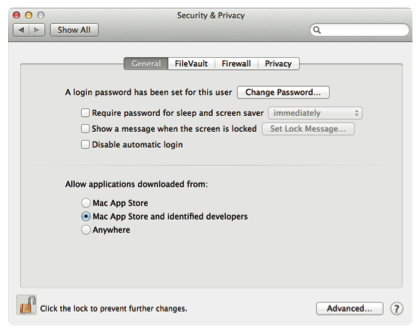
Gatekeeper offers users three levels of security of app downloads. At its strictest level, it will allow only apps downloaded from the Mac App Store to be installed. This adds two kinds of protection. First, apps most be approved by Apple to get into the store. Second, new developer rules for the App Store sharply restrict the amount of damage an app can do, although potentially at a considerable loss of functionality. Starting March 1, all apps submitted to the App Store must run in a “sandbox,” a restriction similar to that imposed on iOS developers, that limits a program’s access to system resources.
That will be too much security for many Mac users, since it would cripple many applications that depend on extensive communication with other apps–often the case in programs used for content creation or software development. So Mountain Lion offers a more expansive option that allows installation of App Store downloads plus any app signed with a valid Apple developer ID. Before installation, the signature is checked against an Apple database to make sure the app has not been identified as malware, that the developer is not known to have distributed malware, and that the code has not been tampered with.
If you attempt to install code that lacks a valid signature, Mountain Lion will throw up a dialog box warning you. If you choose to install it anyway, you can control-click the app or its installer and use the context menu to override Gatekeeper.
Finally, for those who prefer to live dangerous, and “Anywhere” setting allows promiscuous downloads without any warnings (an administrative password is till required for installation.)
I think Apple has hit this one right. There has been a lot of doomsaying on blogs that Apple was going to take the same locked-down approach to Mac apps that it does to iOS. But Gatekeeper’s tiered system shows that Apple understands there is a big difference between Mac (and Mac users) and iOS. I think the great majority of users will go for the middle option (isn’t that always the case when you are given three choices) since it provides the best tradeoff between security and functionality. On the whole, this is a big step forward by Apple that Microsoft ought to give a serious look at for Windows 8.