
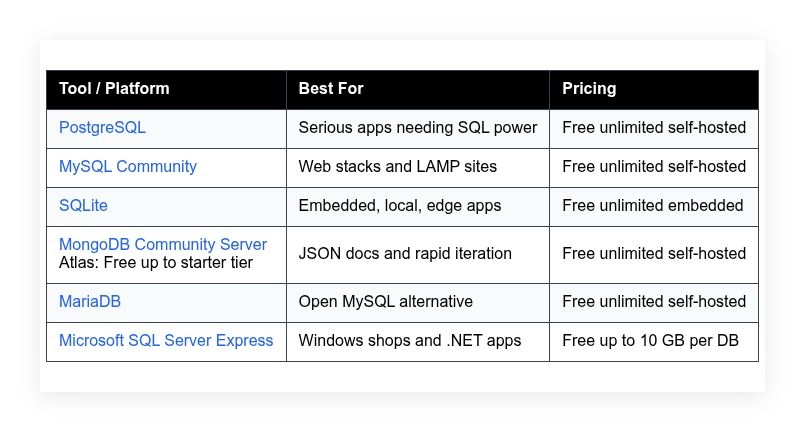
Every free database looks free until you hit the part that is not: a storage cap, a license clause that changes once you make money, or a hosting bill that appears the moment you leave localhost. This guide compares six options — PostgreSQL, MySQL Community, SQLite, MongoDB Community Server, MariaDB, and Microsoft SQL Server Express — covering what each does well, who it suits, and where it falls short.
How we put this list together: we went through each tool’s official website, pricing page, and documentation, and checked what the free plan actually includes and where the paid tiers begin. Prices and plan limits change often, so confirm the details on the vendor’s site before you commit.
My take
After comparing these databases, my main takeaway is that “free” is the easy part. All six are free to run. The real decision is about what happens later: hosting costs, licensing terms if you grow, and how hard it is to move if you choose wrong.
My opinion is that PostgreSQL is the safest default for most new projects, not because it is the fastest or simplest, but because it rarely forces you to switch. It handles relational data, JSON, full-text search, and geospatial work, and every major cloud offers it as a managed service.
I would push back on picking MongoDB just because the data looks like JSON. Postgres handles JSON well enough for many projects. Choose a document database when the data genuinely has no stable structure. And never underestimate SQLite. For local apps, tools, and prototypes, a database that is just a file removes an entire category of problems.
Comparison of 6 best free database software in 2026 with pricing and recommended use cases
Below is a closer look at each tool, followed by our overall recommendations.
What is a free database software?
Free database software is a data management system you can use without paying a license fee. It stores, organizes, and retrieves data for apps, websites, and internal tools, and a good one gives you control, performance, and a clear path to own your data without lock-in or surprise costs.
The practical leap is scale: where a spreadsheet tops out at tens of thousands of rows, a well-tuned database can handle millions while keeping queries under a second. At its core, a database lets developers, analysts, and operators capture inputs from apps and services, structure the data, query it predictably, and ship reliable features fast.
Teams often pair databases with ORMs, ETL tools, backup services, and observability stacks — companions like Prisma, dbt, pgBackRest, Grafana, and Prometheus. Not every free option fits every workload, which is why careful evaluation matters.
How to choose the best free database software
Picking a database can feel overwhelming. There are many good choices, each with opinions on schemas, scaling, and hosting. We wrote this to help you find the right match for your workload, team skills, and hosting plan without getting stuck in research loops.
A few questions worth asking before you commit:
- How generous is the free tier or community license for your use?
- Can you do core tasks like backups, restores, and migrations easily?
- Will this scale without rewrites when traffic doubles or triples?
- What will your costs look like if you move to managed hosting later?
- Does it support the features you need: transactions, indexing, JSON, views?
- What analytics or performance insights can you get out of the box?
- How hard is it to migrate away if you must switch in a year?
- What reliability tools exist: replication, failover, WAL, tooling?
- Are drivers, connectors, and ORMs mature for your language stack?
Our rankings below weigh these questions so you do not have to start from scratch.
6 best free database software in 2026
Here are our top picks for the best free database software:
- PostgreSQL
- MySQL Community
- SQLite
- MongoDB Community Server
- MariaDB
- Microsoft SQL Server Express
1. PostgreSQL
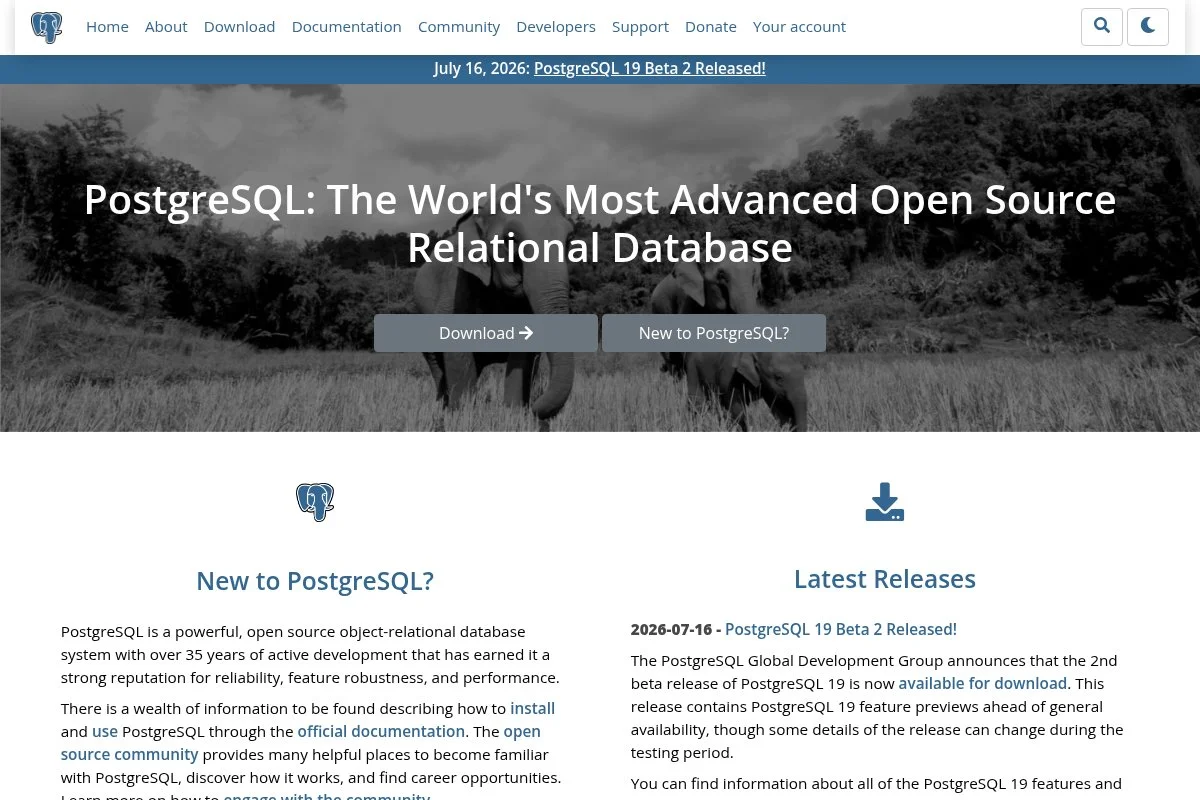
PostgreSQL is a modern, standards-focused relational database trusted by startups and large companies. It has decades of development, a strong core team, and a vibrant extension ecosystem.
It is free to run anywhere, and getting started is straightforward with package installers on Linux, macOS, and Windows. The psql shell and popular GUIs like pgAdmin or TablePlus make day one friendly, and daily work centers on SQL, indexes, and JSON features. Recent releases added logical replication improvements, JSON path enhancements, and parallelism gains that widen use cases from analytics to multi-tenant SaaS and event-driven apps. On managed hosts you get point-in-time recovery, automated failover, and read replicas with minimal setup, and PostGIS for geospatial work is a standout many competitors lack natively.
Postgres hits the right balance of reliability, features, and portability for most production apps. We also like the documentation quality: clear, practical, and paired with endless community guides when you need deeper help.
How PostgreSQL works and key features
Postgres uses a classic SQL interface with ACID transactions and MVCC for concurrency. The experience is text-first, but GUIs make schema editing, backups, and query tuning approachable. You can customize with extensions like PostGIS, pgCron, and pg_stat_statements, and advanced users script with PL/pgSQL, add generated columns, and build materialized views for speed.
You get rich indexing, full-text search, and JSONB for semi-structured data, with performance views exposing locks, slow queries, and cache behavior for real tuning. Automation can handle backups, WAL archiving, and scheduled tasks, and many teams wire it to Airflow, Debezium, or Kafka for streaming workloads. Beyond the core, you will find foreign data wrappers, partitioning, and logical replication; community support is active, and most cloud providers offer managed Postgres if you later want hands-off ops. Overall, it is friendly to beginners and powerful for advanced users.
Who PostgreSQL is for
Best for SaaS builders, data analysts, fintech projects, content platforms, and any team that needs strong consistency. It excels at transactional apps with reporting needs and geospatial use cases via PostGIS. If you must store flexible JSON with strong SQL, it shines. For pure document-heavy apps without joins, a document store might be simpler.
PostgreSQL pricing
Postgres uses the PostgreSQL License, which is permissive and free. There is no feature-gated paid edition from the core project. Cost only appears if you choose managed hosting.
- Community: $0/month, self hosted, includes full SQL, JSONB, extensions support.
- Managed options vary by provider if you upgrade later.
Compared to others, this is great value. You get enterprise-grade features at no license cost. If you pay a host later, annual plans usually bring savings and backups bundled.
Pros and cons of PostgreSQL
- Pros: Feature rich SQL and JSON in one engine, strong extensions, great docs, free license with no limits.
- Pros: Scales from hobby to serious production, easy future path to managed.
- Cons: Tuning requires learning WAL, vacuum, and indexes.
- Cons: Write heavy analytics can need partitioning and careful design.
If you want one free database to bet on, Postgres is our first pick. Choose something else only if your use case is clearly not relational.
PostgreSQL reviews
G2 and Capterra list PostgreSQL with high 4 to 5 star averages. Reviews are strong on reliability and feature depth. Counts vary by listing because cloud hosts are often combined.
2. MySQL Community

MySQL Community Edition is a popular open-source relational database that powers many classic web apps. Oracle stewards the project, and it has a huge install base across hosting providers.
The community edition is free, and setup is quick on Linux and Windows with apt, yum, or MSI installers. You will use the mysql client or GUIs like MySQL Workbench, and daily work includes schema design, indexes, and InnoDB tuning. Recent releases improved InnoDB performance, window functions, common table expressions, and JSON support, making modern SQL patterns easier than in older versions. Oracle’s enterprise features add security extras and tooling if you later pay, and many managed hosts provide backups, replicas, and point-in-time recovery at a service level.
MySQL remains a strong choice for legacy LAMP stacks or WordPress at scale — it stays predictable and fast when schema design is clean. We also like the wide driver support: you will find stable connectors in every major language and ORM.
How MySQL Community works and key features
MySQL offers a simple SQL interface and ships with InnoDB as the default storage engine. The editor experience is CLI-first, with MySQL Workbench covering modeling, queries, and administration. Templates are not a thing in the database itself, but Workbench provides schema design tools, and power users rely on triggers, stored procedures, and partitioning for scale.
Monitoring surfaces slow queries and index misses. You can automate backups and replicas, and cron tasks handle exports or checks, with extra tools like MyDumper helping on big datasets. The ecosystem is vast, including ORMs like Sequelize, Prisma, and Eloquent, and support ranges from community forums to paid Oracle support if you need it. The overall feel is beginner-friendly with battle-tested paths for advanced needs.
Who MySQL Community is for
Best for web developers, WordPress operators, ecommerce sites, analytics backends, and teams on classic LAMP stacks. It excels for read-heavy workloads with careful indexing. If you need advanced GIS or complex SQL features, Postgres may fit better. Beginner friendly with lots of tutorials.
MySQL Community pricing
MySQL Community Edition is free under the GPL. You can run it for commercial projects without a license fee. Oracle’s commercial editions add features and support.
- Community: $0/month, self hosted, includes InnoDB, JSON, replication.
- Commercial editions: Paid, feature and support based, optional.
Value is strong if you stick to community and self hosting. Managed hosting costs are comparable to Postgres on most providers. Annual billing on managed services often reduces spend.
Pros and cons of MySQL Community
- Pros: Huge ecosystem, fast for web apps, easy hosting, free.
- Pros: Familiar to many teams, great driver and ORM support.
- Cons: Fewer advanced SQL features than Postgres.
- Cons: Some enterprise tools sit behind paid tiers.
Pick MySQL if your stack already leans on it or you want simple, proven performance. If you want deeper SQL features, check Postgres first.
MySQL Community reviews
G2 and Capterra show high ratings for MySQL as a whole. Reviews praise stability and speed. Community edition reviews are often grouped with commercial variants.
3. SQLite

SQLite is a serverless SQL database embedded in your app. It is public domain, tiny, and famously reliable for mobile, desktop, and edge workloads.
There is nothing to install beyond a library — you read and write to a single file on disk, and tools like the sqlite3 CLI and DB Browser for SQLite make exploration quick. Recent builds improved write concurrency with WAL mode and added JSON and window functions, so it keeps gaining modern SQL while staying lean. Advanced extensions include FTS5 for fast text search and R*Tree for spatial indexes, and many frameworks ship with SQLite as the default dev database, which makes bootstrapping a new app painless.
SQLite suits prototypes, CLI tools, local analytics, and small apps that do not need a separate server. The testing story is strong too: you can version the database file with your code and ship predictable fixtures.
How SQLite works and key features
SQLite runs in-process, so there is no daemon to manage. The interface is standard SQL with a simple CLI and many GUI options for browsing tables and indexes. You customize pragmas for performance and use WAL mode for concurrent reads and writes, and JSON functions, FTS5, and virtual tables add power for search and semi-structured data.
Backups are as simple as copying a file, though hot backups need care, and for automation you can run VACUUM and integrity checks on a schedule. Support is community-driven with lots of docs and recipes, and tooling spans ORMs like SQLAlchemy, Active Record, and Prisma. Overall, SQLite is beginner-friendly and perfect for embedded or local-first apps.
Who SQLite is for
Best for mobile apps, desktop software, IoT devices, test suites, and prototypes. It excels when you want zero ops and a small footprint. If you need multi-user network access with heavy writes, use a server database. Very approachable for beginners.
SQLite pricing
SQLite is in the public domain. You can use it for any purpose with no license fees. Optional support is available from third parties.
- Public domain: $0/month, embedded library, full SQL features.
The value is unmatched for local data. There is nothing to pay and nothing to manage.
Pros and cons of SQLite
- Pros: Zero configuration, tiny footprint, public domain, fast reads.
- Pros: Great for tests and offline first apps.
- Cons: Not built for high concurrent writes across many clients.
- Cons: Requires discipline for backups and file safety.
Choose SQLite for local storage or small services. Pick a server database if you expect many concurrent users and heavy writes.
SQLite reviews
Third party review sites list SQLite less often as it ships inside apps. Developer forums and GitHub issues are the best source of feedback.
4. MongoDB Community Server

MongoDB Community Server is a free document database that stores JSON-like documents. The company has grown a strong cloud product, but the community server remains free to run.
Install locally or on a VM and start writing documents fast — the shell and Compass GUI make it simple to query and index, and daily use centers on collections, documents, and flexible schemas. Recent versions improved time series collections, sharding, and Atlas integrations, which opens doors for IoT, event logs, and analytics on document data. Advanced features like change streams, multi-document ACID transactions, and aggregation pipelines set it apart from many NoSQL peers, and in managed Atlas, backups and triggers smooth operations.
We like MongoDB for quick iteration on content or event-driven apps where schema evolves quickly — it lowers friction when shape changes weekly. The learning curve is reasonable, and the docs include recipes that map common SQL thinking to document patterns.
How MongoDB Community Server works and key features
MongoDB uses a document model with a query language based on JSON-like operators. The Compass GUI covers CRUD, indexes, and visual explain plans. Schema validation is optional and can be tightened over time, and power users rely on aggregation pipelines, lookup joins, and change streams to drive real-time features.
Analytics show slow operations and index hints, and automation can run backups, build indexes in the background, and fire triggers in Atlas. Beyond core storage, you get time series collections, text search, and geospatial queries; community support is strong, and paid support is available if you move to Atlas. Overall, MongoDB is friendly for rapid prototyping and scales well with sharding when planned early.
Who MongoDB Community Server is for
Best for content feeds, event logs, IoT, catalogs, and apps with evolving schemas. Great when JSON is a natural fit. If you need complex multi-table joins or strict transactions, a relational database may be easier. Beginner friendly with good GUIs.
MongoDB Community Server pricing
Community Server is free to run on your own servers. MongoDB Atlas offers a free starter tier if you prefer hosted, with paid tiers for more resources.
- Community Server: $0/month, self hosted, full document database features.
- Atlas: Free starter, then usage based paid plans.
The value is strong if you self host for development or small apps. Managed Atlas adds cost but reduces ops, and annual commitments can lower spend.
Pros and cons of MongoDB Community Server
- Pros: Flexible schema, rich aggregation, solid GUI tools, free to self host.
- Pros: Strong support for time series and geospatial data.
- Cons: Joins are limited compared to SQL, modeling takes care.
- Cons: Sharding adds complexity when scaling writes.
Pick MongoDB if JSON documents map cleanly to your data. Stick to SQL if you need strict relational integrity across many tables.
MongoDB Community Server reviews
G2 and TrustRadius show high ratings for MongoDB overall. Reviews call out fast iteration and developer experience. Community and cloud editions are often reviewed together.
5. MariaDB

MariaDB is a community-developed fork of MySQL created by original MySQL developers. It aims for open development with MySQL compatibility and its own performance features.
It is free to use and easy to install across platforms, and familiar tools like the mysql client and GUI apps work as expected. Daily work mirrors MySQL with engines like InnoDB and Aria. Recent releases shipped improvements in replication, temporals, and compatibility features, which helps when porting apps or running mixed environments. Advanced options include ColumnStore for analytics and Galera Cluster for synchronous replication — strong differentiators if you need scale-out reads and writes.
MariaDB works as a drop-in replacement for MySQL on Linux servers. The project culture feels open and responsive: release notes are clear and migration guides are solid.
How MariaDB works and key features
MariaDB uses a familiar SQL interface with pluggable storage engines. The experience is similar to MySQL, with the same client tools and broad ORM support. You can tune performance by picking engines and indexes that fit your workload, and replication and Galera clustering provide high-availability options.
Analytics and monitoring rely on slow query logs and performance schema, and automation covers backups, schema migrations, and failover scripts. Beyond core features, ColumnStore enables columnar analytics; community forums and commercial support from MariaDB plc are available if you need it. Overall, it is a pragmatic choice for teams that want MySQL compatibility with open development.
Who MariaDB is for
Best for Linux admins, web developers, CMS users, and teams migrating from MySQL. It excels where compatibility and open governance matter. If you depend on Oracle-specific MySQL features, standard MySQL may be safer. Friendly for beginners with lots of shared docs.
MariaDB pricing
MariaDB Server is free under GPL. You can run it in production at no cost. MariaDB plc sells enterprise features and support contracts if needed.
- Community: $0/month, self hosted, MySQL compatible, replication, Galera support.
- Enterprise options: Paid, for support and extra tooling.
Value is strong for self hosting. Managed MariaDB pricing varies by host and usually aligns with MySQL tiers. Annual plans often lower costs.
Pros and cons of MariaDB
- Pros: MySQL compatible, open development, Galera cluster support, free.
- Pros: ColumnStore for analytics is handy.
- Cons: Some edge cases differ from MySQL behavior.
- Cons: Enterprise features split between community and paid offerings.
Choose MariaDB for open MySQL compatibility and clustering options. If you rely on Oracle only features, stick with MySQL.
MariaDB reviews
G2 and Capterra show positive ratings for MariaDB. Users like performance and open development. Some reviews note minor differences from MySQL during migrations.
6. Microsoft SQL Server Express

SQL Server Express is the free edition of Microsoft SQL Server. It keeps the core engine and limits database size and resources, which suits small apps and learning.
Setup is friendly on Windows with guided installers, and you will likely use SQL Server Management Studio for queries, backups, and indexing — daily use feels polished and GUI-driven. Recent SQL Server releases improved performance, query store, and compatibility with Linux, and Express benefits from the same engine improvements even with edition limits. Higher paid editions add SQL Agent, advanced analytics, and high-availability features, and if you grow, upgrades within the Microsoft stack are straightforward.
We like Express for student projects, small internal tools, or Windows shops that want easy management — it is a gentle path into the full SQL Server world. Documentation and community answers are plentiful, so you will find guides for nearly any admin task.
How SQL Server Express works and key features
SQL Server Express uses T-SQL with a polished GUI in SSMS. The interface makes backups, restores, and index management very approachable. You get templates in SSMS for common tasks, and advanced users rely on execution plans, query store, and columnstore indexes in higher editions for analytics.
Basic performance metrics are available in SSMS. Automation is limited in Express because SQL Agent is not included, but Windows Task Scheduler and scripts fill the gap. The ecosystem includes .NET connectors, Entity Framework, and strong BI tooling via Power BI, and support ranges from Microsoft docs to active forums. Overall, it is beginner-friendly for Windows and pairs well with .NET apps.
Who SQL Server Express is for
Best for students, small business apps, internal tools, and Windows-based shops. It excels when SSMS-centric workflows matter. If you need more than 10 GB per database or SQL Agent, plan for a paid edition. Friendly for beginners, especially on Windows.
Microsoft SQL Server Express pricing
Express is free with limits on database size and resources. Paid editions scale features and cores for larger workloads.
- Express: $0/month, up to 10 GB per database, core engine, SSMS support.
- Standard and Enterprise: Paid, add SQL Agent, HA, advanced analytics.
The free tier is generous for learning and small apps. If you grow, costs rise with cores and features, but the upgrade path is clean inside the Microsoft stack.
Pros and cons of Microsoft SQL Server Express
- Pros: Polished GUI, great docs, strong Windows integration, free.
- Pros: Easy upgrade path to paid editions.
- Cons: 10 GB per database cap and limited resources.
- Cons: SQL Agent missing, so automation needs workarounds.
Choose Express for Windows centric teams and small tools. Move to Standard or Enterprise when limits or HA needs appear.
Microsoft SQL Server Express reviews
Most third party reviews group Express with full SQL Server. Ratings on G2 and TrustRadius are strong for the platform overall. Edition specific reviews are limited.
What is the best free database software right now?
The short version: PostgreSQL as the default, MySQL Community when your stack already expects it, and SQLite for anything local or embedded.
Postgres is our top pick. JSONB and PostGIS stand out: it handles both strict relational data and flexible JSON without hacks. On value, it gives advanced features at zero license cost, and managed Postgres is available across major clouds at competitive prices.
MySQL Community is our second choice — a close alternative if your stack, plugins, or hosting already expect MySQL. Recent SQL improvements plus the massive ecosystem make it a safe bet for content and ecommerce sites, and its real strength is web-stack fit. If you are modernizing a LAMP site or running WordPress at scale, MySQL is a confident choice.
Third, we recommend SQLite for projects that do not need a server. It is unbeatable for prototypes, desktop apps, and command-line tools, and the no-ops model is a gift when speed matters. Many teams use more than one: Postgres for production APIs and SQLite for local analytics and quick ETL staging — matching the tool to the job keeps things simple. Choosing between Postgres and MySQL is the real fork in the road; Postgres wins here on JSONB, extensions, and strong SQL, but if your team is already deep in MySQL, that momentum is a fine reason to pick it. Whatever you choose: ship something small, back it up, and let usage guide your next step.
Frequently Asked Questions
Q: Which free database should I use for a small web app?
We would start with PostgreSQL or MySQL Community. Both handle typical CRUD apps well. Pick the one your framework and hosting support best. You can always migrate later.
Q: Is MongoDB’s free tier enough for production?
Self hosted MongoDB Community Server can run production if you manage backups and monitoring. The Atlas free tier is better for learning and prototypes. Paid Atlas plans reduce ops when you grow.
Q: Can I switch databases later without pain?
Switching is possible, but not free of work. Use an ORM, keep SQL portable, and write migration scripts. Plan exports and imports early to avoid surprises.
Q: How do I back up a free database safely?
Schedule regular dumps and test restores. For Postgres or MySQL, combine logical dumps with offsite storage. For SQLite, copy the file safely with WAL mode and verify checksums.