
There is a particular kind of stress in dispatching two trucks with a spreadsheet and a phone: a driver calls for directions on one line while a customer asks on the other why their load has not moved, and you are the only one who knows the answer to either. That was my morning for longer than I care to admit, and it is why I went looking for a clean board, live ETAs, and one place to keep orders, docs, and driver updates — the free or nearly free version of what the big carriers pay dearly for.
The search surprised me. Most systems look alike on the surface, but the setup, the limits, and the hidden costs vary enormously, and free is not always free once you add a truck or two. What I took from the small fleets that run well is that they keep it simple: clear statuses, accurate driver locations, and fast document sharing beat fancy screens every day. You do not need the most complex TMS to win your morning — you need tools your dispatcher and drivers will actually use on day one.
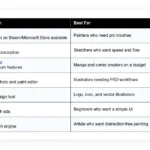
This guide covers the free and freemium dispatch options I trust, who each is for, and where you may hit a wall. No sponsors. Here is the quick summary before we dive in.
Comparison of 8 best free truck dispatch software in 2026 with pricing and recommended use cases
Scroll down for my hands-on take on each option. I will also share which one I use today and call out the easiest free picks for beginners.
What is a truck dispatch software?
Truck dispatch software is a system that helps carriers and dispatchers plan loads, assign drivers, track vehicles, and share updates and documents with customers in real time. Clear status, ETAs, and proof mean fewer calls, fewer misses, and faster cash.
Consider the math: if a dispatcher shaves 10 minutes off each stop with better routing and ePOD, a five-stop day saves 50 minutes — roughly one extra short run each week per truck. The core job is that dispatchers, fleet owners, and drivers turn orders from shippers or brokers into planned trips, send them to the driver app, track progress, and close with documents and invoices.
Many teams pair dispatch software with ELDs, GPS trackers, load boards, accounting tools like QuickBooks, and scanning apps for bills of lading and proof of delivery. Not every option here does the same job equally well, so it pays to match the tool to your fleet size and freight type.
How to choose the best truck dispatch software
Picking dispatch software can feel overwhelming — lots of look-alike screens and plans that change once you add a truck or two. I wrote this to help you find a setup that fits how you actually run freight, whether you are local, regional, or running OTR.
Most guides are written by vendors or media sites with paid listings. I am not sponsored by any platform here. This is my honest view based on real use and fleet feedback. A few questions worth asking:
- How generous is the free tier and what are the exact limits?
- Can I assign loads and update status in under two clicks?
- Will this scale from two trucks to ten without a rebuild?
- How fast does pricing climb as I add users, drivers, or orders?
- Does it cover the features I need: routing, ePOD, docs, invoices?
- What analytics do I get: on-time, detention, revenue per mile?
- How hard is it to export data and switch if I outgrow it?
- How reliable is the driver app and GPS accuracy during low signal?
- Does it integrate with my ELD, load boards, or accounting stack?
The ranked picks below answer those points, and I call out tradeoffs so you can avoid dead ends. Let’s get into the list.
8 best free truck dispatch software in 2026
Here are my top picks for the best truck dispatch software:
- AscendTMS
- Shipday
- Detrack
- Odoo (Field Service + Fleet)
- ERPNext
- Traccar
- Airtable
- Trello
Let’s see which one is right for you.
1. AscendTMS
AscendTMS is a full TMS for carriers and brokers, designed to manage loads, dispatch, accounting, and customers in one place. It has been around for years and is widely used by small fleets that want a real TMS without heavy setup.
You can start on the free plan in minutes. The interface uses a familiar load board with clear statuses, plus a driver mobile experience for updates and document capture, and daily tasks like assigning drivers, sharing ePOD, and invoicing are straightforward. Recent releases focused on accounting workflows, document automation, and more connections to load sources and tracking, which means less retyping and more accurate status for customers. Paid tiers add deeper reporting, advanced billing, and broader integrations — customer portals, carrier onboarding, and multi-branch support help when you add more trucks or broker more freight.
I keep AscendTMS in my toolkit for small fleet trials because it gives owners a true feel for a TMS without the cost or a long contract on day one. I also like that the setup guides are practical: the support articles read like someone who has done the job, not just a developer writing help text.
How AscendTMS works and key features
The main screen is a load board with sortable columns and filters. You can build orders, plan trips, and drag to assign drivers; templates speed up repeat customers and lanes, and documents attach to each load record. Advanced users can connect integrations for tracking, rating, and accounting, export data for custom reports, and built-in analytics show margins, revenue per mile, and on-time performance.
Automation rules help with emails, document requests, and status updates. Extras include customer portals, carrier compliance, and invoice management. Support is available through a knowledge base and ticketed help, with training resources for new dispatchers. The overall feel is balanced — friendly for beginners yet powerful enough for a growing small fleet.
Who AscendTMS is for
Best for owner-operators adding a second truck, small carriers, and broker-carriers who want one system. It fits dry van, reefer, and flatbed lanes. The driver app and ePOD make it useful for local runs too. If you need heavy ELD control or advanced yard workflows, a larger enterprise TMS may fit better. No deep technical skill is required.
AscendTMS pricing
AscendTMS uses a freemium model. You can run a limited free plan, then upgrade for more features and integrations. Pricing typically scales by user and added modules.
- Free: $0/month, core TMS basics, limited features and ads, includes basic dispatch and document storage
- Premium: from $99/user/month, adds advanced reporting, accounting workflows, and more integrations
- Enterprise: custom pricing, multi-branch, custom integrations, and dedicated support
Value is strong if you are starting up. The free tier lets you test real workflows. Annual billing on paid plans can lower per-user cost. As you add users, budget for the jump from free to premium.
Pros and cons of AscendTMS
- Pros: True TMS features on a free plan, fast setup, clear load board and driver app, strong upgrade path.
- Pros: Good value compared to heavier TMS platforms.
- Pros: Integrations cover common small fleet needs.
- Cons: Free plan includes limits and ads, some advanced reports require upgrades.
- Cons: Interface can feel dense while learning.
Overall, AscendTMS is my first stop for a free start with room to grow. If you need deep enterprise controls, look elsewhere.
AscendTMS reviews
Capterra and G2 both list AscendTMS with strong user ratings. Public review counts vary by year. If ratings matter to you, check the latest on both sites for current scores.
2. Shipday
Shipday is a delivery dispatch platform focused on last-mile. While it is not built only for trucking, small fleets running local routes use it for fast order assignment, GPS tracking, and ePOD.
You can start on a free plan and invite drivers with a link. The console is clean, with map-based dispatch and timeline views, and core actions include assigning stops, sending driver notifications, and collecting signatures and photos. Recent updates centered on route planning and customer ETA alerts, which helps reduce where-is-my-order calls and tightens local delivery windows. Paid tiers add auto-dispatch, advanced route optimization, and integrations with ordering systems, which help if you grow to more dense urban routes.
I have used Shipday for pop-up pilot projects to prove a local delivery service before buying a bigger stack — it gets out of the way and lets you run. Support docs are short and practical, and the mobile app is easy for drivers who do not like fiddly screens.
How Shipday works and key features
Shipday’s dispatcher view centers on a live map. You can drag orders between drivers and edit stops with a click; templates let you reuse service types and pickup notes, while branding tools set customer alerts. You can connect webhooks and common commerce tools on paid tiers, analytics show on-time rates, delivery durations, and driver performance, and automation covers assignment rules and customer ETA texts.
Extras include simple landing pages, forms, and labels. Support comes by email and a help center with step-by-step guides — small teams often tell me their drivers learned it in a single shift. Overall, it is beginner-friendly and strong for local runs; it is not a full TMS, but for same-day routes it shines.
Who Shipday is for
Best for courier-style delivery, hotshot, and local dedicated runs. Great when you need fast mapping, ePOD, and ETA texts. If you require rating, brokerage workflows, or detailed line-haul planning, use a TMS like AscendTMS. No special technical skill needed.
Shipday pricing
Shipday uses a freemium model based on orders and features. The free tier is generous for testing, then you can scale into paid automation and integrations.
- Starter: $0/month, up to 300 orders/month, includes manual dispatch, driver app, basic tracking
- Professional: from $29/month, higher order limits, ETA texts, basic route planning
- Advanced: from $79/month, auto-dispatch, route optimization, integrations
- Enterprise: custom pricing, higher volumes, dedicated support
For local fleets, value is strong. If you run long-haul with complex rating, you will need a TMS. Annual savings are sometimes available on request.
Pros and cons of Shipday
- Pros: Free tier with useful limits, clean map dispatch, easy driver app.
- Pros: Fast ePOD and ETA alerts reduce calls.
- Cons: Not a full carrier TMS, limited accounting and rating features.
- Cons: Route optimization and integrations sit behind paid tiers.
If you run local or regional same-day, Shipday is a quick win. For line-haul planning and brokerage, pick a TMS instead.
Shipday reviews
Product review coverage is light on major software sites. User feedback I have seen highlights ease of use and quick setup for small teams.
3. Detrack

Detrack focuses on ePOD, live vehicle tracking, and simple dispatch. It is popular with delivery and transport teams that want proof and visibility without a heavy system.
You can start on a free plan and send jobs to drivers quickly. The dashboard shows today’s jobs, driver locations, and delivery progress, and the driver app handles signatures, photos, and notes. Recent releases improved route planning and customer notifications, making it easier to keep shippers in the loop without manual texts. Paid tiers unlock more automation, route optimization, and advanced POD controls as you add drivers and stops.
I like Detrack for teams that want to fix lost paperwork first — better POD pays for itself when billing speed matters. The help center is clear and the app is lightweight, which drivers appreciate on older phones.
How Detrack works and key features
Dispatchers create or import jobs, assign them, and track drivers on a live map. The interface is simple with list and map views; templates speed common services, while labels and barcodes help reduce mistakes. Advanced users tie in webhooks, Zapier-style flows, or APIs for order feeds, reports cover on-time rates, delivery durations, and exceptions, and automation supports status emails and customer ETA messages.
Detrack includes POD capture, photos, and notes out of the box. Support is responsive by email and guides. The experience is beginner-friendly with room to grow.
Who Detrack is for
Best for transport teams that need ePOD and live tracking with minimal setup. It fits hotshot, local cartage, and scheduled runs. If you need brokerage, rating, or EDI, use a full TMS. No special technical skill needed.
Detrack pricing
Detrack uses freemium plus per-vehicle pricing on advanced plans. The free plan covers core tracking and dispatch. Pro adds ePOD features and routing controls.
- Free: $0/month, basic tracking and dispatch, mobile app, limited features
- Detrack Pro: from $26/vehicle/month, advanced ePOD, routing, alerts
- Enterprise: custom pricing, higher volumes and support options
The free plan is useful for testing. Pricing scales with vehicles, which is predictable. If you have many occasional drivers, budget accordingly.
Pros and cons of Detrack
- Pros: Fast ePOD, simple dispatch screen, fair entry price.
- Pros: Good live tracking and customer alerts.
- Cons: Not a full TMS, limited rating and invoicing.
- Cons: Route optimization sits on paid plans.
Pick Detrack if POD and visibility are the first fires to put out. Choose a TMS if you need rating and carrier management.
Detrack reviews
Major review sites list Detrack with favorable comments, but counts vary. Feedback often praises the driver app and photo POD.
4. Odoo (Field Service + Fleet)
Odoo is a modular business suite. With Field Service and Fleet apps, you can build a custom dispatch flow using Odoo’s one app free model. It is flexible and works across web and mobile.
You can start free with a single Odoo app. The interface uses list, Kanban, and calendar views for planning, and daily tasks include scheduling, capturing time and materials, and marking jobs done with signatures. Odoo has kept improving its mobile tools and integrations, which opens up light dispatch options without coding. Paid tiers include more apps, studio customization, and broader integrations, so you can add Invoicing, Accounting, and CRM as you grow.
I like Odoo for teams that want custom fields and workflows — it is not a pure trucking TMS, but it can fit specialized local transport. The Odoo community is large, with many tutorials and forums to help you design a simple dispatch pipeline.
How Odoo works and key features
Odoo’s interface is clean and modular. You plan jobs in calendar or Kanban, assign drivers, and track job status; templates and custom fields let you capture customer and freight details. Advanced users can add custom code with Odoo Studio or use APIs for integrations, analytics cover jobs done, time on site, and costs, and automations handle emails, reminders, and task flows.
You can add websites, forms, and invoicing as needed. Support depends on your plan and partner. The experience is flexible if you are willing to configure — powerful for DIY dispatch, best for teams open to a little setup.
Who Odoo is for
Best for mixed service and transport teams that need custom fields, approvals, or bundling with accounting and CRM. Great for local dedicated work or service-plus-delivery. If you want plug-and-play trucking features like rating or EDI, use a TMS. Some setup skill helps.
Odoo pricing
Odoo pricing is app and user based. One app is free on Odoo Online, which is enough to run a basic dispatch workflow. More apps and features require paid tiers.
- One App: $0/user/month, choose one app free, core features for that app
- Standard: from $31.10/user/month, full suite access, hosting included
- Custom: higher tier, customizations and studio, pricing varies
- Enterprise/Partner: custom pricing, support and deployment help
Value is strong for one app free. If you need both Field Service and Fleet together, you will be on paid tiers. Annual billing can save money compared to monthly.
Pros and cons of Odoo
- Pros: One app free is useful, highly flexible workflows.
- Pros: Can bundle dispatch with invoicing and CRM.
- Cons: Not trucking specific, requires configuration time.
- Cons: Using multiple apps moves you to paid tiers.
If you want a customizable, low-cost start, Odoo works well. If you want out-of-box trucking features, pick a TMS.
Odoo reviews
G2 and Capterra list Odoo with strong ratings across modules. Counts vary by app. Check recent reviews for Field Service if that is your focus.
5. ERPNext

ERPNext is open-source ERP software. With Projects, Fleet, and custom DocTypes, you can build dispatch and ePOD workflows. Self-hosting is free, and the community is active.
You can try the cloud version or install it yourself. The UI uses list and Kanban views with strong permissions, and daily use covers job creation, assignment, time, and document tracking. Recent versions improved the web interface and form builder, so you can customize fields for freight details, lanes, and customer SLAs. Paid hosting adds support, backups, and managed updates, and you can integrate accounting, CRM, and help desk in the same system.
I recommend ERPNext if you have light dev help and want zero license fees — it scales well if you build what you need. The documentation and forum are helpful, and many sample apps give you a head start.
How ERPNext works and key features
ERPNext centers on forms and workflows. You create jobs, assign drivers, and track status with custom fields; templates and print formats handle bills of lading and POD. Advanced users extend with custom scripts and API integrations, reports can show costs, time, and delivery KPIs, and automations handle emails, approvals, and escalations.
Extras include websites, forms, and a help desk. Support comes from the community or paid cloud plans. The experience rewards teams that like to customize — powerful if you are comfortable with a little engineering.
Who ERPNext is for
Best for cost-sensitive carriers with in-house tech or a consultant. Good for specialized local services and fleets that want tight control of data. If you want plug-and-play dispatch, choose a ready TMS. Some technical skill helps.
ERPNext pricing
ERPNext is free to self-host under an open-source license. Cloud hosting and support are available from the vendor. Pricing scales by users and support level.
- Self-host: $0/month, full features, community support
- Cloud Standard: from $50/user/month, hosting, backups, support
- Enterprise: custom pricing, advanced support and services
Value is excellent if you can self-host. Cloud pricing is mid-range. Annual options can lower cost versus monthly.
Pros and cons of ERPNext
- Pros: Free to self-host, highly customizable, broad suite in one place.
- Pros: Good printing and form control for freight docs.
- Cons: Requires configuration and maintenance.
- Cons: No trucking-specific modules out of the box.
If you want control and low license cost, ERPNext is a smart path. If you want a ready trucking workflow, start with a TMS.
ERPNext reviews
G2 and Capterra list ERPNext with positive ratings, especially for value. Counts change by release. Reviewers often mention flexibility and price.
6. Traccar

Traccar is an open-source GPS tracking platform that supports a wide range of trackers and phones. It is not a TMS, but it plugs a big gap in location visibility for free.
You can self-host or pay for Traccar Cloud. The web console shows live locations, history, and alerts, and day to day you track vehicles, set geofences, and analyze routes. Updates routinely add device support and UI polish, which keeps older trackers and budget phones useful for fleets. Paid cloud hosting gives you managed uptime and support, and you can pair Traccar with a lightweight dispatch tool to round out your stack.
I like Traccar for owner-operators and small fleets that need live locations without a high monthly fee. The community is active and helpful for setup questions.
How Traccar works and key features
The interface shows a map with your devices and a timeline. You can drill into trips, stops, and speed; templates and groups help organize drivers or trucks by region. Advanced users integrate data via API or webhooks into dispatch or BI tools, reports summarize mileage, idle time, and events, and automations can trigger emails or alerts for geofences and speeding.
Extras include mobile apps and device management. Support is community based for self-host or via cloud plans. It is simple and reliable once configured — a great free add-on for GPS, not a full dispatch tool.
Who Traccar is for
Best for owners who need low-cost GPS tracking, mixed devices, or bring-your-own trackers. Useful as a visibility layer under a light dispatch process. If you need rating, POD, or invoices, pair it with another tool. Some setup skill helps for self-hosting.
Traccar pricing
Traccar is free to self-host. The vendor offers a cloud service with per-device pricing, which is predictable for small fleets.
- Self-host: $0/month, full open-source server, community support
- Cloud: from $5/device/month, hosting and support included
- Enterprise: custom, higher volumes and features
For small fleets, one or two devices cost less than many ELD add-ons. If you scale, watch per-device costs.
Pros and cons of Traccar
- Pros: Free open-source, supports many devices, solid reports.
- Pros: Good API for adding GPS into other tools.
- Cons: Not a dispatch or TMS system.
- Cons: Self-hosting and device setup take time.
Use Traccar to add live GPS to a free or DIY dispatch setup. If you want an all-in-one, pick a TMS.
Traccar reviews
There are few formal reviews on G2 or Capterra. Community feedback is strong on reliability and device support.
7. Airtable

Airtable is a database-meets-spreadsheet with views that work well as a DIY dispatch board. It is not trucking software, but many small teams start here for free.
You can build a base with loads, drivers, and customers in an hour. Grid, Kanban, and calendar views keep status clear, and forms let customers or brokers submit load info directly. Airtable keeps improving automation and interfaces, which helps you standardize updates without writing code. Paid tiers add more records, advanced automations, and permissions, and you can connect to maps and routing tools through integrations.
I have shipped working dispatch bases in a weekend for teams that needed a stopgap — it is fast, familiar, and flexible. The template gallery and community give you a head start if you are new.
How Airtable works and key features
Airtable’s editor feels like a sheet with superpowers. You build tables for loads, drivers, and assets, then link them; views filter by status or driver, while Kanban helps drag loads through stages. Advanced users add scripts, custom apps, or APIs to pull GPS and push updates, dashboards show counts, dates, and simple KPIs, and automations send emails or texts when a status changes.
Extras include forms, page designer for docs, and interfaces for clean internal apps. Support includes a help center and active forums. The experience is beginner-friendly yet deep when you need it — a flexible DIY path if you lack a TMS budget.
Who Airtable is for
Best for startups and small carriers that need a dispatch board now. Good for custom fields, light automations, and intake forms. If you need rating, EDI, or complex accounting, choose a TMS. No coding required for basics.
Airtable pricing
Airtable has a free plan with record and storage limits. Paid plans scale by user and features. Costs rise with seats and advanced automations.
- Free: $0/user/month, limited records and automations, core views
- Plus: from $20/user/month, higher limits and sync
- Business: from $45/user/month, advanced permissions and interfaces
- Enterprise: custom pricing, SSO, scale, and governance
The free tier is enough for a basic dispatch base. Prices climb with users, so keep your team lean or use shared interfaces.
Pros and cons of Airtable
- Pros: Very fast to set up, flexible views, useful automations.
- Pros: Free plan works for simple boards.
- Cons: Not a trucking system, no built-in GPS or ePOD.
- Cons: Costs rise with team size.
If you need a custom dispatch board this week, Airtable fits. For full trucking features, plan to graduate later.
Airtable reviews
Airtable holds high ratings on G2 and Capterra across thousands of reviews. Users often praise ease of use and flexibility for custom workflows.
8. Trello

Trello is a Kanban board tool that many dispatchers use as a simple status wall. It is not trucking specific, but it is free and very clear for small teams.
You can make lists for Booked, Dispatched, In Transit, and Delivered. Cards hold load details, files, and checklists, and moving cards between lists becomes your live plan. Trello keeps adding views and automations, and timeline and calendar views help with time-based planning. Paid plans add more automations, fields, and permissions, and you can connect to forms, email, and maps with Power-Ups.
I use Trello for audits and short-term pop-up boards — it is the fastest way to get a visual plan everyone can follow. There is a huge library of templates, and new dispatchers learn it in minutes.
How Trello works and key features
Trello’s interface is pure drag and drop. Each card holds load info, due dates, and attachments; labels and filters make it easy to find loads by driver or lane. Advanced users add Butler automations for reminders and status moves, reports are light but you can export data or connect to dashboards, and Power-Ups add forms, maps, and simple routing links.
Support includes a knowledge base and community. Day to day, it is a simple status board that reduces confusion — the simplest way to visualize your dispatch workflow for free.
Who Trello is for
Best for very small fleets and temporary teams that need a visible plan. It excels at status tracking and shared checklists. If you need GPS, rating, or ePOD, pair it with other tools. No technical skill required.
Trello pricing
Trello prices by user and features. The free plan is generous for simple boards, then you can add views and automations on paid tiers.
- Free: $0/user/month, unlimited cards and basic views
- Standard: from $6/user/month, advanced fields and automations
- Premium: from $12.50/user/month, timeline, calendar, and more views
- Enterprise: custom pricing, security and controls
For a small team, the free tier can last a long time. Costs rise as you add users and automation volume.
Pros and cons of Trello
- Pros: Fastest to learn, clean visual boards, free plan.
- Pros: Flexible with Power-Ups and automations.
- Cons: Not built for trucking, limited reporting.
- Cons: No built-in GPS or ePOD.
If you want a visual board today, Trello is perfect. For full dispatch and tracking, combine it with other tools or move to a TMS.
Trello reviews
Trello has high ratings on G2 and Capterra with large review counts. Users like the simplicity and fast onboarding.
What is the best truck dispatch software right now?
The short version: AscendTMS for a true free-to-start TMS, Shipday for local last-mile dispatch, and Detrack if ePOD and tracking are your must-haves.
AscendTMS is my number one because I actually use it for small fleet pilots, and this opinion is not sponsored. I found it while helping an owner-operator add a second truck — the free plan got us a working board, driver updates, and invoicing in a day, and the load board view and driver app were the clinchers. On value it scales better than many paid-only systems: some carrier TMS options start near triple digits per user right away, so being able to run free and upgrade once revenue per truck rises keeps cash flow sane. One avoided missed invoice can cover a month of premium features.
Shipday is my second choice when the work is local and time-boxed. The map-first dispatch, quick ePOD, and ETA texts reduce phone calls, and recent route planning upgrades make it stronger for dense city routes and hotshot teams. Its unique strength is speed — you can go from zero to live tracking and customer alerts in under an hour, and if my freight shifted to same-day retail drops, I would likely pick Shipday first.
Detrack lands third because it nails ePOD and tracking with little friction — if paperwork is your pain, it fixes that fast, and the free plan helps you prove the change before paying. In practice I often mix tools: for one team we ran AscendTMS for loads and billing plus Traccar for GPS, and for a pop-up local project we used Shipday alone. Choosing between the top two is not easy, but I stayed with AscendTMS because we needed billing, customer records, and a broker-carrier mix — if your world is same-day local, Shipday wins on simplicity. If I had to start over, I would spin up AscendTMS again and layer in GPS as needed. Safe dispatching out there.
Frequently Asked Questions
Q: What is the best free truck dispatch software for a brand-new carrier?
I suggest starting with AscendTMS if you want a real TMS, or Shipday if you run local delivery. Both have free tiers that are quick to set up.
Q: Can free plans handle ePOD and driver tracking?
Yes, at a basic level. Detrack and Shipday support ePOD and live tracking on free or entry plans. For advanced routing and alerts, you may need to upgrade.
Q: How do I add GPS without paying a lot?
Use Traccar. It is free to self-host and supports many devices. Pair it with a light dispatch tool, then consider paid cloud if you want managed hosting.
Q: When should I move from DIY tools like Airtable or Trello to a TMS?
Move once you feel the pain of missing docs, late updates, or manual invoices. That is usually around the second or third truck or when you add brokerage work.