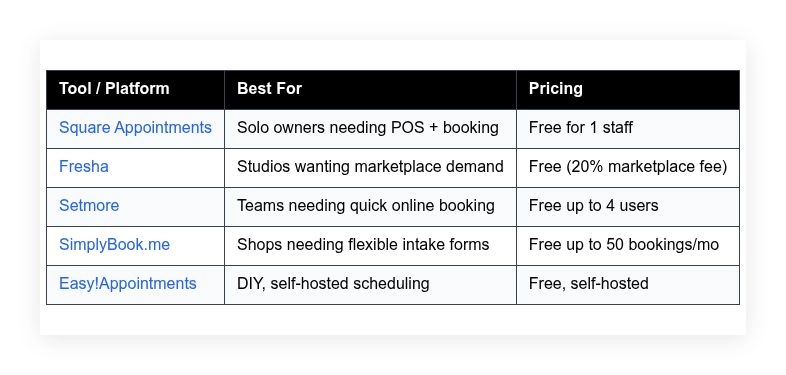
Tanning studios need booking, reminders, deposits, and fast checkout, and several platforms offer these on free plans. This guide compares five options — Square Appointments, Fresha, Setmore, SimplyBook.me, and Easy!Appointments — covering what each does well, who it suits, what the free plan includes, and where it falls short.
How we put this list together: we went through each tool’s official website, pricing page, and documentation, and checked what the free plan actually includes and where the paid tiers begin. Prices and plan limits change often, so confirm the details on the vendor’s site before you commit.
My take
After looking at what each platform includes for free, my main conclusion is that tanning studios are well served by general salon booking tools. You do not need tanning-specific software unless you run bed timers, lotion inventory, and memberships at scale.
The decision I would focus on is how you want to handle no-shows and memberships. Square Appointments and Fresha both make deposits and card-on-file easy, which matters more for revenue than any scheduling feature. SimplyBook.me is the one to look at if packages, punch cards, or recurring memberships are central to how you sell.
I would be cautious about Fresha’s marketplace for one reason: new-client fees can add up if most of your growth comes from it. It is a good way to fill empty slots early on, but read the fee terms carefully and keep encouraging regulars to book directly once they are coming back.
Comparison of 5 best tanning salon software in 2026 with pricing and recommended use cases
Below is a closer look at each tool, followed by our overall recommendations.
What is a tanning salon software?
Tanning salon software is a scheduling and point-of-sale solution built to handle appointments, staff calendars, reminders, client profiles, and package or membership tracking for tanning services. With the right tool you track no-shows, bed usage, and rebook rates, which means steadier revenue and fewer gaps in your day.
The payoff is easy to see: if your no-show rate drops from 12 percent to 5 percent thanks to deposits and texts, that is seven more kept sessions out of 100 bookings — at a $25 session, $175 you were losing every week. At its core, tanning salon software lets owners and staff accept bookings online, confirm by text or email, collect payments or deposits, log client history and lotion sales, and report on performance across rooms and people.
Many studios pair their scheduling stack with marketing tools like SMS campaigns, Instagram booking buttons, Google Reserve, and a simple website builder to capture walk-ins who search at lunch. Not every option fits every studio, so it pays to weigh limits, fees, and growth paths before you commit.
How to choose the best tanning salon software
Picking software can feel like picking a new bed model — lots of specs, lots of jargon, and a price tag that may balloon once you start using it daily. We wrote this to help you match a free or near-free option to your current stage without painting yourself into a corner as you grow.
A few questions worth asking:
- How generous is the free plan, and what are the hard limits?
- Can you add services, blocks, and staff quickly from your phone?
- Will it scale to multiple rooms and locations without a rewrite?
- How will costs rise as staff, messages, and bookings grow?
- Does it support packages, memberships, and deposits the way you need?
- What analytics can you see daily: no-shows, rebooks, revenue by staff?
- How hard is it to export your clients and move if you outgrow it?
- What uptime, support hours, and status page does the vendor provide?
- Does it integrate with card readers, SMS, and Google or Instagram booking?
Our ranked picks below reflect these questions so you can pick with confidence.
5 best tanning salon software in 2026
Here are our top picks for the best tanning salon software:
- Square Appointments
- Fresha
- Setmore
- SimplyBook.me
- Easy!Appointments
1. Square Appointments
Square Appointments is an all-in-one booking and POS system designed for service businesses. Square has been a fixture in small business payments for more than a decade, with trusted hardware, transparent fees, and banking features baked in.
The free plan for a single staff member makes getting started simple, with a clean calendar, fast checkout, and easy deposits or card-on-file. Recent updates tightened the tie between booking and payments: tap-to-pay on iPhone and Android, improved prepayments, and better inventory tools make retail addons like lotions and goggles painless to track. On paid tiers you unlock advanced staff permissions, no-show protection rules, and multiple location management, and Square also offers Payroll, Marketing, and Savings, which can replace several add-ons you might pay for elsewhere.
Square Appointments has fast checkout, and the free tier covers solo owners without a monthly bill. The extra thing we like is hardware choice: if you already own a Square Reader you are up and running, and if not, the hardware store down the street probably has one.
How Square Appointments works and key features
Square’s calendar is a simple, touch-friendly interface that runs well on phones and tablets. You can add services, set room buffers, and block beds between sessions to control turnover time, templates for services and staff roles help you standardize pricing and durations, and advanced users can add custom fields at booking for skin type or package IDs; integrations cover Instagram and Google booking, email marketing, and more.
Analytics include sales by item and staff, no-show and cancellation tracking, deposit capture, and tips, and automated texts, confirmations, and reminders reduce missed visits, plus inventory tools for lotions and upsells. Square bundles extras like a website builder, invoices, and gift cards, with support through a help center, live chat on business days, and a solid status page. Overall, it is very beginner friendly yet strong enough for a growing single-location shop.
Who Square Appointments is for
Best for solo studio owners, mobile spray tan artists, small tanning shops adding online booking for the first time, and salons selling lotions at checkout. If you need in-person POS and deposits without a monthly fee, start here. Multi-location chains may want the paid tiers. Rooms with complex package rules may find dedicated tanning systems more flexible.
Square Appointments pricing
Square prices by feature tier and locations, with a forever-free plan for one staff member. Card processing is pay-as-you-go.
- Free: $0/month, 1 staff, online booking, calendar, basic no-show protection, Square POS, and invoicing.
- Plus: $29/month per location, more staff, advanced no-show protection, custom templates, and multiple location tools.
- Premium: $69/month per location, advanced permissions, capacity management, and priority support.
Value is strong for solo owners. Paid tiers stay reasonable compared to salon suites that start charging per staff and per message. Annual savings may apply on add-on products like Marketing, not on Appointments itself. Processing fees are separate.
Pros and cons of Square Appointments
Pros:
- Free plan covers solo owners with POS and deposits.
- Fast, reliable checkout with affordable hardware.
- Solid analytics and inventory for retail addons.
- Easy integrations with social and website tools.
Cons:
- Paid plans required for more staff and permissions.
- Package and membership logic is basic compared to niche tanning systems.
- SMS campaigns require extra Square Marketing spend.
If you are solo or just getting started, Square is our easiest recommendation. Larger teams with heavy membership rules may want something deeper.
Square Appointments reviews
Square Appointments has a large presence on major review sites. Ratings and counts change often, but feedback is consistent about ease of use and value on the free tier.
2. Fresha
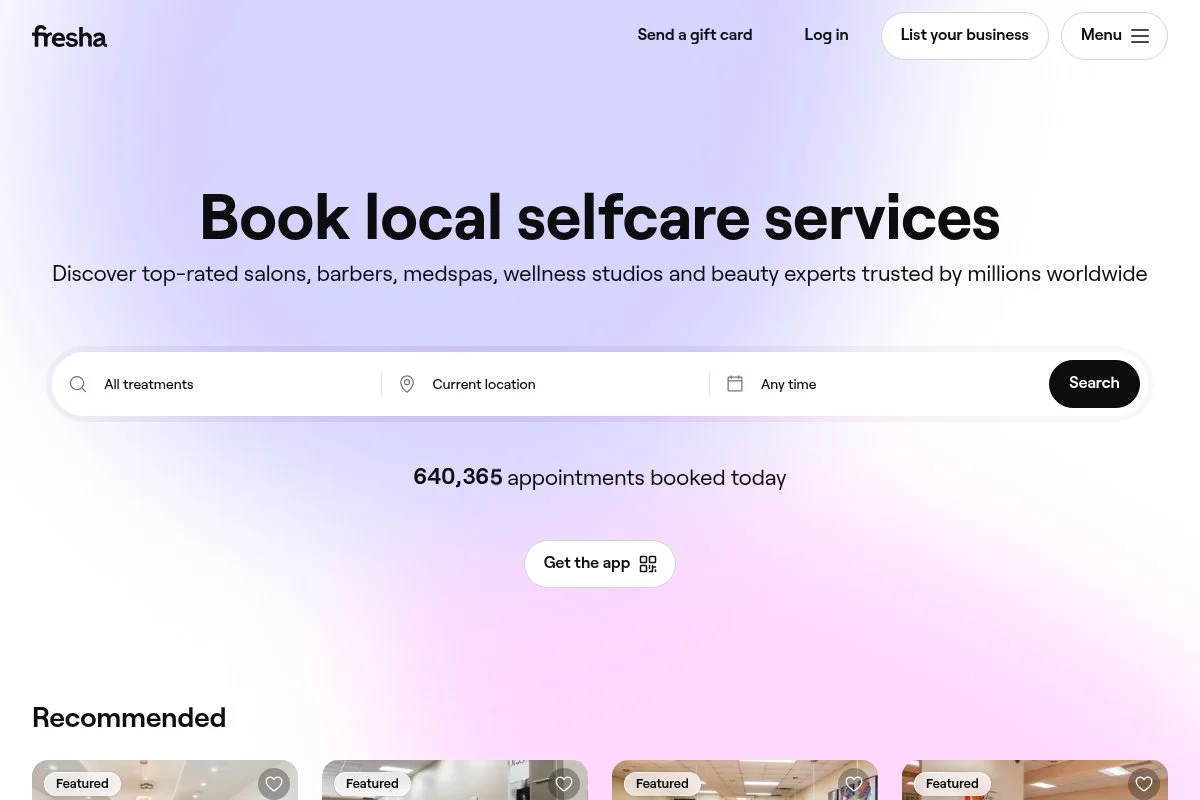
Fresha is a booking platform focused on salons and wellness, with a free software model and a built-in marketplace. The company has scaled globally and is well known among beauty pros for its no-subscription approach.
Setup is quick — you can create services, sync hours, and add a booking link to Instagram in one session, with a clean calendar, a polished client app, and automated reminders included. Recent improvements center on payments and marketing: card-on-file, deposits, and better client reactivation tools help reduce no-shows and fill slow slots, and the marketplace listing can drive new clients in some cities. On the paid side you are not paying a monthly fee — Fresha earns from processing and a fee on new clients who book through the marketplace — and you also get optional features like blast marketing and advanced reports.
Fresha helps when a studio needs fresh demand, since its marketplace can bring first-time visitors. The extra win is that client profiles feel thoughtful — notes, past services, and rebook prompts are easy to access at the desk.
How Fresha works and key features
Fresha’s interface is modern and mobile friendly. You manage services, beds or rooms as resources, and staff calendars in one view, with customizable service timing to control cleaning or cool-down breaks. Templates and quick-add services speed up setup, advanced users can connect online booking to a website, sync with Instagram booking, and use deposits with saved cards, and the analytics cover revenue, staff performance, no-shows, and product sales.
Automation includes confirmations, reminders, and rebooking nudges, with extra tools like a client app, marketing campaigns, gift cards, and inventory features, and support handled through help docs and in-app assistance. Overall, Fresha is balanced for both beginners and growing studios, especially if you want marketplace reach.
Who Fresha is for
Great for salons that want free software, card-on-file and deposits, teams using Instagram booking, and shops in cities where Fresha’s marketplace is active. If you rely on repeat clients and want zero subscription costs, it fits. Owners who dislike paying a fee on new marketplace clients may prefer a flat-fee tool.
Fresha pricing
Fresha uses a no-subscription model. The software is free to use, with payment processing fees and a fee on first-time marketplace clients.
- Free: $0/month, unlimited staff and bookings, online booking, reminders, basic POS, and client profiles.
- Payments: usage-based, card processing fees apply per transaction.
- Marketplace: 20% fee on new clients booked through the Fresha marketplace.
- Marketing add-ons: optional campaign tools billed as used.
Value can be excellent if the marketplace drives growth and your repeats rebook direct. If you dislike percentage fees, the model may not fit. Check current regional processing rates before you commit.
Pros and cons of Fresha
Pros:
- Truly free software with modern booking and POS.
- Marketplace can bring new clients without ad spend.
- Strong client profiles and reminders reduce no-shows.
- Unlimited staff on the free plan.
Cons:
- 20% fee on first-time marketplace clients.
- Not ideal if your area lacks marketplace demand.
- Advanced marketing may add extra costs.
If you want growth without a subscription, Fresha is a top pick. If fees on first-timers bother you, look to Square or a self-hosted option.
Fresha reviews
Fresha is widely reviewed across salon communities. Major platforms list many recent reviews, with praise for the free model and clean app. Exact ratings shift over time, so we suggest checking G2 and Capterra for the latest.
3. Setmore
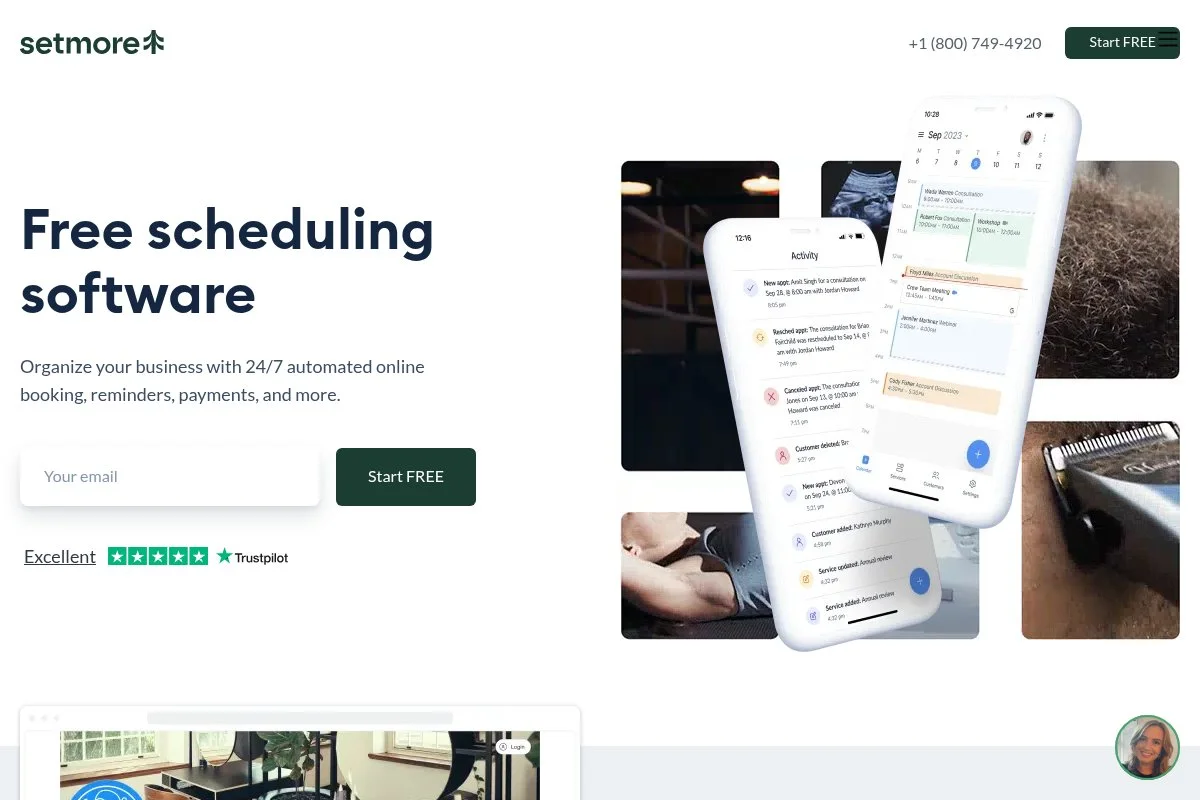
Setmore is a scheduling platform designed for small teams that want quick online booking, a friendly calendar, and solid reminders. It has been around for years and is popular with solo pros and multi-staff shops that need a fast setup.
The free plan supports multiple users, which is rare at this price. Recent updates improved two things owners asked for: better calendar performance on mobile and cleaner customer reminders, and payment integrations keep expanding, which helps if you want deposits. Paid tiers add text reminders, two-way calendar sync, and advanced customizations that help with tanning room timing and staff breaks, plus video meeting features most salons will not need.
We recommend Setmore when a team wants to move fast from a paper book to online booking without a learning curve. Their help guides are clear enough for non-technical owners to follow on their own.
How Setmore works and key features
Setmore’s interface is a straightforward calendar with drag-and-drop moves and color-coded staff, and service templates let you control duration and padding for cleaning or bed cooldown. You can customize booking pages, add your logo, and embed a button on your site; for advanced needs Setmore connects with Stripe and Square to take deposits, and reports include appointment volume, cancellations, and staff metrics.
Automation covers confirmations and reminders, paid tiers enable SMS reminders, and extras include website embeds, Facebook and Instagram integrations, and basic customer notes, with support available through help docs and chat. The experience is beginner friendly, with enough depth for a small team handling several beds.
Who Setmore is for
Ideal for small tanning salons, hybrid beauty shops with spray tanning, mobile techs, and teams moving off paper. It shines for quick online booking and reminders. If you need deep membership billing or complex package tracking, you might outgrow it.
Setmore pricing
Setmore offers a generous free tier and paid plans that unlock more automation and integrations. Pricing scales by features and number of users.
- Free: $0/month, up to 4 users, online booking, email reminders, basic calendar tools.
- Pro: $12/user/month, adds SMS reminders, two-way calendar sync, and payments.
- Teams: $9/user/month for larger teams on annual billing, advanced features and support.
The free plan is great value for teams starting out. Paid plans stay affordable compared to salon-first suites. Annual billing usually lowers the per-user price. Always confirm current pricing on Setmore’s site since promos can change.
Setmore reviews
Setmore has many public reviews across software directories. Feedback highlights quick setup and a friendly calendar. If you rely on ratings, check the latest on G2 and Capterra since counts change often.
4. SimplyBook.me
SimplyBook.me is a flexible booking system used across many service verticals. It stands out for customizable intake forms and a wide library of add-on features you can toggle on or off.
The free plan allows a modest booking volume and a clean booking page, with services, intake questions for skin type, and client notifications. Recent product work focused on client portals and better widgets, which helps salons that want branded booking without building a full site. Paid tiers unlock more bookings per month, more custom features, and advanced options like memberships, coupons, and POS integrations.
We like SimplyBook.me for studios that need precise intake at booking; the custom fields can be as detailed as your compliance needs. Support docs are thorough, and the interface guides you through each setup step with tooltips.
How SimplyBook.me works and key features
The main interface is a clean dashboard with a calendar, service list, and a feature library, and you choose which modules to enable, like memberships, coupons, or resource management for rooms. Templates help you build a branded booking page, you can embed widgets on your site and add custom fields to collect skin type or consent, and advanced users can style pages and connect with payment providers.
Analytics cover bookings, cancellations, and revenue, automation includes confirmations and reminders, and extra tools include gift cards, memberships, and a client app, with support available via guides and chat. Overall, it balances flexibility with a mild learning curve, which is fair for the control you get.
Who SimplyBook.me is for
Best for salons that need custom intake, memberships, and branded booking widgets. Good for multi-service studios with spray tan, red light, and UV beds. If you want simple and fast only, Square or Setmore may be easier.
SimplyBook.me pricing
SimplyBook.me prices by booking volume and features, with a free tier for light usage.
- Free: $0/month, up to 50 bookings/month, 1 custom feature, booking page, email reminders.
- Basic: $8.25/month on annual billing, higher booking limits and more features.
- Standard: $24.90/month on annual billing, increased bookings, more custom features, and integrations.
- Premium: $49.90/month on annual billing, top limits, membership features, and advanced support.
For light traffic, the free plan works well. Paid plans are mid-range, and annual billing usually reduces the monthly rate. Confirm current limits, as they can vary by region and currency.
SimplyBook.me reviews
SimplyBook.me has a strong footprint on review sites. Owners praise the custom intake and booking widgets. Ratings change over time, so check G2 and Capterra for today’s numbers.
5. Easy!Appointments
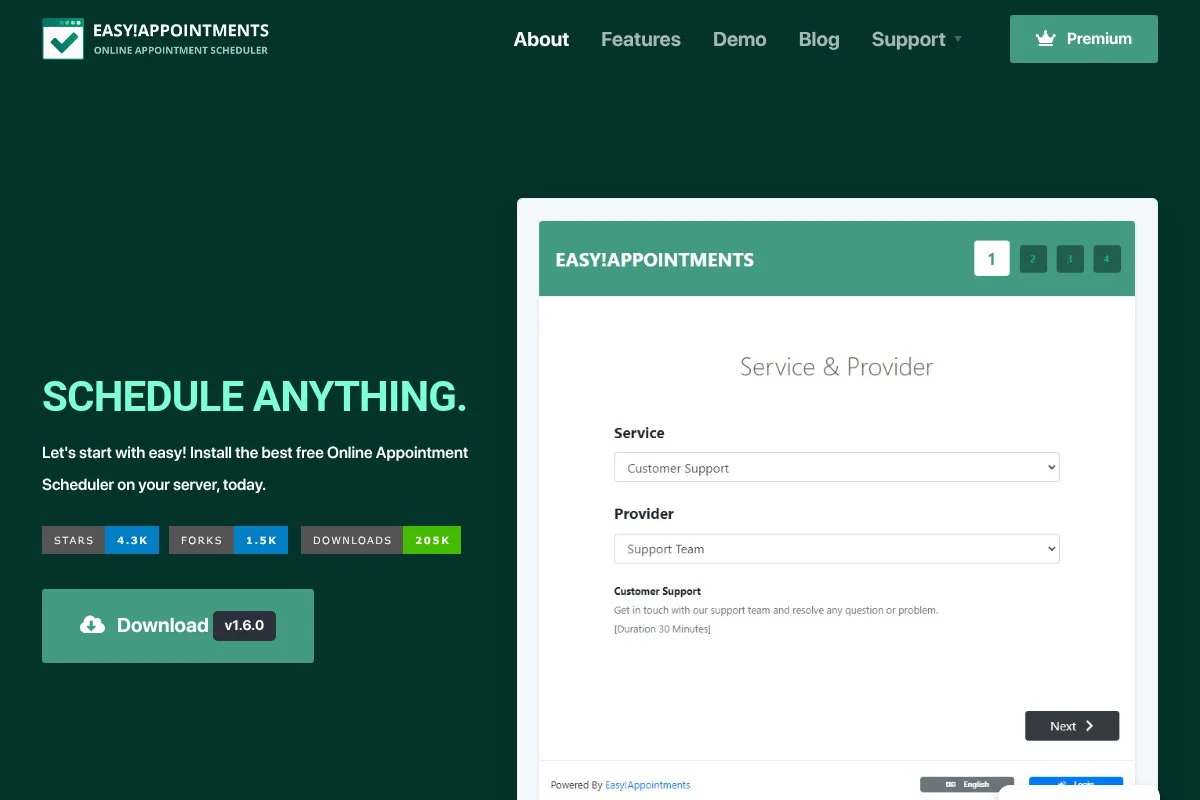
Easy!Appointments is a free, open-source scheduling app you install on your own server. It is popular with DIY owners and agencies who want control, no vendor fees, and the ability to tweak the code.
Setup takes more effort than a hosted tool — it runs on a basic VPS by following the docs, with staff calendars, services, and email notifications out of the box. Active development and community forks keep adding quality-of-life fixes, and you can theme the booking page and extend it with custom logic, handy for room timing and consent screens. There are no paid tiers from the project itself; value comes from zero subscription cost and full data control, and you can pair it with your own payment form or POS.
We suggest this for studios that already have a web helper or IT-minded owner — the freedom is worth it if you like to tinker. Documentation is solid and the codebase is approachable if you have basic PHP and MySQL skills.
How Easy!Appointments works and key features
The interface is a straightforward web calendar with staff and services. You manage business hours, service durations, and buffers for bed cleanup, and the booking page is responsive and can be themed. There is no fancy template gallery, but you can customize HTML and CSS, and advanced users add integrations with payment gateways or SMS using community plugins or custom code.
Reports are basic, covering appointment counts and staff load, email confirmations and reminders work once configured, and you can embed booking on your site and control hosting, backups, and security. Support is community based, and if you are comfortable self-hosting, the experience is powerful and free.
Who Easy!Appointments is for
Great for budget-focused studios with tech help, agencies managing multiple shops, and owners who want full control. It suits custom flows, special consents, and unique timing rules. If you want plug-and-play with card readers and SMS, choose a hosted tool.
Easy!Appointments pricing
The software is free. Your costs are hosting and any development time.
- Core: $0/month, unlimited users and bookings, email notifications, service and staff management.
- Hosting: usage-based, depends on your server choice.
- Add-ons: community or custom, optional time and cost.
If you already pay for hosting, this can be near-zero cost. The tradeoff is your time and maintenance. For many DIY owners, that is a fair deal.
Easy!Appointments reviews
Open-source tools rarely have consolidated ratings on G2 or Capterra. Feedback in forums is positive about control and cost, with the expected caveat that setup takes effort.
What is the best tanning salon software right now?
The short version: Square Appointments for solo owners who want POS and booking without a monthly bill, Fresha if you want a free system plus marketplace demand, and SimplyBook.me if you need flexible intake and memberships.
Square Appointments is our top pick. On value it is hard to beat for a solo shop: competing salon suites might start at $30 to $100 a month before texts and POS add-ons, while Square’s free tier covers the basics and even the Plus plan is cheaper than many entry-level salon bundles, and as you add staff you budget a flat per-location fee rather than juggling per-seat invoices.
Fresha is the runner-up. If you want growth without paying a subscription, the marketplace can introduce first-timers who become regulars, and recent payment and rebooking tools make it stronger for tanning, especially with deposits. Its unique strength is demand generation — a free system plus a storefront in the app where locals search — and in cities where Fresha already has traction, it may be the better pick.
SimplyBook.me is our third choice for studios that need detailed intake, memberships, and branded embeds. Easy!Appointments suits experiments and custom flows that hosted tools do not support out of the box. Choosing between Square and Fresha is a real decision: Square wins on fast checkout, card-on-file deposits, and predictable costs, while Fresha is the better lean if you need new-client reach from day one.
Frequently Asked Questions
Q: What is the best truly free tanning salon software?
For most solo owners, we suggest Square Appointments. It has a forever-free plan with online booking and POS. If you want marketplace demand and no subscription, Fresha is also strong.
Q: Can free plans handle packages and memberships?
Basic package tracking is possible with notes and itemized products in free tools. True memberships often require a paid tier or a workaround. If memberships are core, consider SimplyBook.me’s higher tiers or a dedicated salon suite.
Q: How do I reduce no-shows without paying for SMS?
Use deposits or card-on-file, require confirmations by email, and shorten the cancellation window. Square and Fresha both support deposits on free or low-cost plans, which move the needle more than reminders alone.
Q: What fees should I watch with “free” software?
Watch payment processing fees, new-client marketplace fees in Fresha, and SMS charges if you upgrade. Free is great, but fees can add up as bookings grow. Model a month of usage before you decide.