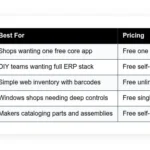

Auto parts inventory is hard to track by hand: thousands of SKUs, alternates and kits, and bins that drift out of sync with the spreadsheet. This guide compares five options — Zoho Inventory, Odoo Inventory Community, OpenBoxes, Stockpile, and ABC Inventory — covering what each does well, who it suits, what the free plan includes, and where it falls short.
How we put this list together: we went through each tool’s official website, pricing page, and documentation, and checked what the free plan actually includes and where the paid tiers begin. Prices and plan limits change often, so confirm the details on the vendor’s site before you commit.
My take
What the research kept pointing back to is that auto parts are harder to track than most inventory. Fitment, alternates, kits, cores, and bin locations all matter, and generic inventory apps only handle some of that well at the free level.
My opinion is that most small shops should not try to replicate a full parts-catalog system for free. Focus on the basics that actually stop money leaking: accurate counts, clear bin locations, and reorder points for your fast movers. Zoho Inventory does those things cleanly on its free plan, which is why it comes out on top.
Where I would push back on the usual advice is around ERP-style tools like Odoo. They are excellent if someone on your team enjoys configuring systems, but they can stall a busy counter if nobody owns them. If you choose Odoo, budget the setup time honestly, and start with barcode receiving and picking before anything else.
Comparison of 5 best auto parts inventory software in 2026 with pricing and recommended use cases
Below is a closer look at each tool, followed by our overall recommendations.
What is an auto parts inventory software?
Auto parts inventory software is a management tool that tracks parts, bins, and orders across a shop or warehouse. Its main purpose is to know what you have, where it is, and when to reorder — which means clean item records, accurate counts, and fast lookups by SKU, OEM, or barcode.
The payoff is concrete: cut stockouts from five per week to one and you save hours of chases and rush buys, and even a 2 percent improvement in fill rate can cover software costs while improving customer trust. The core job is straightforward — parts managers and counter staff receive inventory from suppliers, store it in known locations, sell or consume items on jobs, and use alerts to maintain ideal stock levels.
Shops often pair inventory tools with barcode scanners, accounting systems, shop management software, e-commerce channels, and shipping platforms to sync sales and purchasing. Not all tools offer the same speed, controls, and integrations, so it pays to choose carefully.
How to choose the best auto parts inventory software
Picking inventory software feels overwhelming, and we get it — there are many choices, and they all promise simple control and fewer stockouts. We wrote this to help you match features to your exact needs, not someone else’s spec sheet. Your workflows and volume matter more than hype.
A few questions worth asking:
- How generous is the free tier, and what limits matter day to day?
- Can staff add items, scan barcodes, and post counts without training marathons?
- Will it scale to more warehouses, users, and SKUs as you grow?
- How fast will costs climb with more orders, users, or locations?
- Does it support kitting, serials, and alternates that fit auto parts reality?
- Are analytics clear on stockouts, turns, and aging inventory?
- How hard is it to export data and migrate if you change later?
- What uptime, backups, and audit trails keep your numbers safe?
- Does it integrate with your shop system, marketplaces, and shipping?
The picks below answer those points with real strengths and known tradeoffs.
5 best auto parts inventory software in 2026
Here are our top picks for the best auto parts inventory software:
- Zoho Inventory
- Odoo Inventory (Community)
- OpenBoxes
- Stockpile by Canvus
- ABC Inventory by Almyta
1. Zoho Inventory

Zoho Inventory is a cloud inventory app designed for small and mid-size businesses that want speed with minimal setup. Zoho has decades in business software and a full suite covering CRM, accounting, and more, which gives this tool steady development and support.
You can start on the free plan and get moving in an afternoon. The web app is clean, with quick item creation, barcode fields, and location tracking, and daily work centers on item cards, sales and purchase orders, and automatic stock updates with each transaction. Recent updates brought tighter connections to Zoho Books and popular shipping carriers, which helps auto parts sellers who list online and ship daily, and expanded automation rules that make reorders and notifications more hands-off. On higher tiers you get multi-warehouse support, serial and batch tracking, and advanced automation — useful once you grow into kits for service packages or bundles for online sales, a depth many free tools stop short of.
Zoho Inventory hits the sweet spot between capability and low friction without a pricey contract on day one. We also like the help docs and guided setup: when counter staff can follow a checklist and succeed, adoption sticks.
How Zoho Inventory works and key features
The interface is straightforward. Tabs for Items, Sales, Purchases, Transfers, and Reports keep you oriented, and you can import items by CSV, assign barcodes, set reorder points, and define bins or racks. Templates for invoices, packing slips, and purchase orders are easy to tweak; advanced users can add custom fields and hook into other Zoho apps or third-party tools through integrations and APIs.
Analytics cover stock on hand, aging inventory, sales by item, and order history, and automation can trigger low stock alerts, create purchase orders, and route orders to warehouses. You also get simple tools for online listings and shipping labels through integrations. Support is available through help docs, forums, and standard Zoho channels, and training videos help new staff learn receiving and counts without confusion. Overall, it is beginner friendly while leaving room for power users through integrations and automations.
Who Zoho Inventory is for
Best for independent parts stores, small distributors, Amazon and eBay sellers, and mobile mechanics who stock common items. It shines for order-driven workflows, barcode scanning, and clean reorders. If you need deep manufacturing, heavy EDI, or offline desktop control, other tools fit better. No special technical skill is required.
Zoho Inventory pricing
Zoho Inventory uses a tiered model based on monthly order volume, warehouses, and users. There is a free plan with tight limits, and paid tiers add capacity and advanced features.
- Free: $0/month, up to 50 orders/month, 1 warehouse, and includes basic items, barcodes, and simple reports
- Standard: $/month varies by region, increased orders, 2 warehouses, and includes serials/batches on supported tiers
- Professional: $/month varies by region, higher limits, more warehouses, and includes automations and advanced reports
- Premium/Enterprise: $/month quoted, highest limits and includes multi-warehouse routing and advanced integrations
Value is strong for small shops on the free plan. As orders grow, costs rise, but still track lower than most full ERP tools. Annual billing usually reduces the effective monthly rate. Check your local Zoho site for exact pricing, since it varies by country.
Pros and cons of Zoho Inventory
- Pros:
- Free plan suitable for early-stage shops
- Clean interface and fast onboarding
- Good barcode, serial, and batch options on higher tiers
- Strong ecosystem with Zoho Books and CRM
- Cons:
- Free limits can cap growth fast
- Advanced features require higher tiers
- Not auto-specific catalogs or supplier links out of the box
If you need quick wins and cloud simplicity, start here. If you want total control or heavy customization, keep reading.
Zoho Inventory reviews
G2: 4.5/5 rating (300+ reviews). Capterra: 4.5/5 rating (hundreds of reviews). Feedback highlights ease of use and good value for small teams.
2. Odoo Inventory (Community)

Odoo Inventory is part of the open source Odoo suite, designed for companies that want deep control and flexibility. Odoo has a large global community and many years in production use across retail, distribution, and light manufacturing.
The Community edition is free to self-host. Setup takes more effort than simple SaaS, but you gain serious features: multi-warehouse, putaway rules, barcode flows, and strong reordering, with daily work happening in clean Kanban and list views with quick moves and transfers. Recent releases improved barcode scanning flows and replenishment logic, and the ecosystem keeps adding partner-built connectors that help if you need to tie into marketplaces or shipping tools. Premium Odoo editions add official hosting, advanced modules, and vendor support, so if you want MRP, purchase automation, or accounting under one roof, the paid tiers make that easier than stitching apps together.
We like Odoo for parts distributors that plan to scale — it handles alternates, kits, and complex routes better than most free tools once configured correctly. The documentation and forums are solid, and with a tech-savvy staffer or a local partner you can push Odoo far without breaking the bank.
How Odoo Inventory works and key features
Odoo’s interface supports barcode-driven workflows end to end. You can design receipts, internal moves, and pickings to match your warehouse; templates and views are customizable, and developers can extend models with Python and XML. Advanced users can add custom fields, write rules for replenishment, and integrate with carriers and marketplaces through community modules, while reporting covers stock valuation, lead times, turns, and backorders and automations create purchase orders at set points or based on demand forecasts.
Odoo also includes website, CRM, and accounting modules if you choose to enable them. Support for Community comes from docs and the community, while paid editions include vendor support. Overall, it balances flexibility and depth, though it needs more effort than plug-and-play tools.
Who Odoo Inventory is for
Best for growing parts distributors, multi-location retailers, rebuilders, and shops with in-house tech talent. It excels with multi-warehouse routing, barcodes, kits, and complex reorders. If you want zero maintenance and instant setup, a simpler SaaS option is better. Basic skills help, but a partner can bridge gaps.
Odoo Inventory pricing
Odoo Community is free to self-host. Paid Odoo editions are priced per user and app set, and include hosting and official support. You can start free, then move to paid if you want managed infrastructure and more modules.
- Community: $0/month, self-hosted, and includes core inventory, barcode flows, and basic purchase functions
- Standard/Online: $/user/month, vendor-hosted, and includes broader app access and updates
- Custom/Enterprise: $/user/month, advanced features and includes studio, external APIs, and prioritized support
Compared to paid SaaS, Community offers huge value for teams willing to self-manage. Costs appear when you add hosting, support, or partner services. Annual contracts on paid plans often reduce the effective rate.
Pros and cons of Odoo Inventory
- Pros:
- Free Community edition with deep features
- Strong barcode and warehouse routing
- Expandable into full ERP stack
- Large community and partner network
- Cons:
- Setup and maintenance require effort
- Best modules often need configuration or partners
- Training takes longer for nontechnical teams
Choose Odoo if you want control and growth headroom. If you need a quick start with minimal upkeep, go Zoho or Stockpile.
Odoo Inventory reviews
G2: 4.3/5 rating (2000+ reviews). Capterra: 4.1/5 rating (thousands of reviews). Reviews praise flexibility, with notes on setup complexity.
3. OpenBoxes

OpenBoxes is a free, open source supply chain system focused on inventory, orders, and shipments across multiple facilities. It started in healthcare logistics and has been battle tested in complex, resource-constrained settings, which says a lot about reliability.
Getting started means self-hosting or working with a service partner. The interface is practical and fast once configured, and daily tasks cover receiving, bin transfers, stock counts, and shipment tracking with alerts for low stock and expirations. Recent updates improved performance and reporting, and the project stays active with a public roadmap and issue tracker. For advanced teams, OpenBoxes offers strong multi-warehouse flows, role permissions, and audit trails — you can manage long chains of transfers and maintain clear visibility, which is rare in the free tier world.
We suggest OpenBoxes when a shop has several locations and a technical contact; if you handle high SKU counts and frequent transfers, it can shine. The community is responsive and documentation is practical — it is not flashy, but it does the hard work well.
How OpenBoxes works and key features
OpenBoxes uses a structured web interface with clear menus for stock management, shipments, and requisitions. You can customize fields and workflows to fit your warehouse, and for advanced needs the codebase is open for extensions and integrations. Reporting includes stock status, movement history, and demand summaries; you can schedule tasks and alerts for reorders and expirations, and automation helps reduce manual steps for recurring transfers or routine replenishment.
Extras include request management and permission layers to separate roles across sites. Support comes from docs and community, with optional paid help from consultants. Overall, it is powerful for operations that need control across locations, with the tradeoff of setup effort.
Who OpenBoxes is for
Best for regional distributors, multi-branch retailers, and warehouse teams that need audits and permissions. It excels at transfers, requisitions, and detailed movement logs. If you want plug-and-play cloud and polished UX, try Zoho or Stockpile. Some technical comfort is helpful.
OpenBoxes pricing
OpenBoxes is free to self-host under an open source license. Costs relate to hosting, maintenance, and any consulting you choose. There is no per-user fee baked into the software.
- Community: $0/month, self-hosted, and includes multi-site inventory, transfers, and reporting
- Hosted/Support: $/month or quoted by partner, managed hosting and includes updates and priority help
Compared to commercial tools, total cost can be low if you have in-house IT. If you outsource everything, pricing ends up closer to mid-tier SaaS, still without user caps. Annual support contracts may lower hourly rates.
Pros and cons of OpenBoxes
- Pros:
- Free and open source with no user caps
- Strong multi-warehouse and audit features
- Flexible workflows and custom fields
- Cons:
- Requires hosting and upkeep
- Interface is utilitarian, not sleek
- Fewer plug-and-play retail integrations
Pick OpenBoxes if control across locations beats all else. If you need fast setup and sales channel sync, look at Zoho instead.
OpenBoxes reviews
Limited public reviews on major platforms. Most feedback comes from user forums and case studies, which are positive on reliability and control.
4. Stockpile by Canvus

Stockpile is a free online inventory app built by Canvus, the team behind retail fixtures and store tools. It aims for speed and simplicity over piles of configuration, which is great for small parts counters that need counts under control today.
Setup takes minutes: create items, set locations, and start counting. The interface is clean with instant search, and daily use centers on receiving, adjustments, and tracking movement history to see who changed what. Updates focus on stability and ease of use. There is no sprawling feature set, and that is the point — you get item records, locations, and history, which for many counters covers 80 percent of the pain with almost no learning curve.
Stockpile is a good first step for shops drowning in spreadsheets; once counts are steady, you can graduate to deeper tools if needed. Support is basic but responsive for a free product, and the help pages and prompts are clear enough for nontechnical staff.
How Stockpile works and key features
The app runs in a browser with a straightforward layout. You add items with SKUs, barcodes, and locations, then post receipts and adjustments as work happens, and custom fields allow notes like OEM cross references or vehicle fitment tags. Templates are minimal, which keeps things simple; reporting covers stock on hand and movement history, and while there is no advanced automation you can set simple reorder cues with saved views and exports.
There are no deep integrations or code hooks, which is the tradeoff for being free and simple. Overall, it is a fast way to get from messy to manageable, best for single-location teams.
Who Stockpile is for
Best for single-location parts counters, small garages, mobile mechanics with a storeroom, and new e-commerce sellers. It excels at basic counts and locations. If you need multi-warehouse, serials, advanced reports, or channel integrations, choose Zoho or Odoo. No technical skill required.
Stockpile pricing
Stockpile is free to use with no known caps on items or users. There are no paid tiers listed, which keeps budgeting easy. You only need a browser.
- Free: $0/month, unlimited items and users, and includes item management, locations, and history
Against paid tools, this is strong value for basic needs. If you later require deeper features, migration is a manual export and import into your next system.
Pros and cons of Stockpile
- Pros:
- Totally free with simple onboarding
- Fast search and clean interface
- Great stepping stone from spreadsheets
- Cons:
- No advanced automation or analytics
- No native integrations for sales channels
- Single-warehouse focus
Choose Stockpile if you need a no-cost fix now. Plan to upgrade if your operation grows.
Stockpile reviews
Limited public reviews on G2 or Capterra. Anecdotal feedback from small retailers is positive on simplicity and speed.
5. ABC Inventory by Almyta
ABC Inventory is a free Windows desktop system from Almyta. It is designed for businesses that want a capable, no-subscription tool on a local PC, and Almyta has been around for years in warehouse and manufacturing software.
Setup means installing on a Windows machine and creating your company database. The interface is old-school but thorough — you get item master data, receiving, shipping, and inventory adjustments with a lot of knobs for control. The product stays stable rather than chasing trends, and that predictability helps shops that prefer offline tools and steady workflows. Advanced options include kitting, serial numbers, and multi-location support; you can print barcodes and labels, and export data for reporting in Excel.
We recommend ABC Inventory to teams that cannot rely on the internet or want a zero-cost desktop install — it is not pretty, but it handles the basics with power features when you need them. Support is via manuals and the vendor’s site, and paid upgrades in the Almyta family exist if you want more.
How ABC Inventory works and key features
The Windows interface uses detailed forms and grids. You define items with SKUs, barcodes, and locations, then run receipts, issues, and transfers, and custom fields and notes handle OEM cross references and alternates. Templates for labels and documents are available and adjustable, reporting is export-friendly so Excel becomes your analysis partner, and automation is limited to rules you set inside the app and scheduled tasks on Windows.
There are no native cloud integrations, but CSV exports let you sync with accounting or online stores manually. The experience suits power users who like detailed control and local data.
Who ABC Inventory is for
Best for small warehouses, repair shops, and rural operations that need offline access. It excels at kitting, serials, and detailed item data. If you want cloud access, mobile scanners, or easy integrations, look at Zoho or Odoo. Some Windows comfort is helpful.
ABC Inventory pricing
ABC Inventory is free to download and use on Windows. There are optional paid products in the Almyta lineup with more features and support. You can stay on the free edition as long as it meets your needs.
- Free: $0 one-time, local Windows install, and includes item management, kitting, serials, and labels
- Paid upgrades: $ quoted for Almyta variants, add support and extra modules
For zero subscription, the value is real. The tradeoff is manual backups and no built-in cloud features. If you later move to SaaS, plan an export and import to your next tool.
Pros and cons of ABC Inventory
- Pros:
- Free desktop with no monthly fees
- Deep item controls, kitting, and serials
- Works offline without internet
- Cons:
- Windows only, dated interface
- No native e-commerce or shipping integrations
- Manual backups and updates
Pick ABC Inventory if local control matters most. If you want mobile access and integrations, a cloud tool fits better.
ABC Inventory reviews
Limited public reviews on G2 or Capterra. Most feedback comes from forums and user groups, generally positive on value for a free desktop tool.
What is the best auto parts inventory software right now?
The short version: Zoho Inventory for most small shops, Odoo Inventory Community for teams that want control and room to grow, and Stockpile if you need a free quick fix with almost no setup.
Zoho Inventory is our top pick. It delivers fast wins for lean shops without a big bill. On value it scales well before you feel cost pressure: the free plan covers early days, and paid tiers cost less than full ERP while adding warehouses, serials, and automations, where alternatives that match those features often start much higher and add per-user fees on top.
Odoo is a close second. If you have a tech-friendly manager or a partner, Odoo Community gives you deep warehouse logic for free, and recent improvements in barcode flows make it friendlier on the floor — add paid hosting later if you want the convenience without losing the model you already trust. Its special strength is scope: you can bring CRM, purchasing, and accounting into the same stack over time, and for a fast-growing distributor with multiple sites, it may be the place to start.
For a simple start, Stockpile is great — free, fast, and enough to stop the bleeding if counts are messy, and if you do not need multi-warehouse or channel sync it can carry you longer than you might expect. A staged approach works: Stockpile to get counts right, then Zoho for orders and shipping, and Odoo when custom routes or growth demand more control. Choosing between Zoho and Odoo is a real decision: Zoho wins on speed and lower setup effort for smaller teams, while Odoo suits a bigger IT bench or complex routing from day one.
Frequently Asked Questions
Q: Is there any truly free auto parts inventory software?
Yes. Zoho Inventory has a free plan with limits. Stockpile by Canvus is free with no known caps. Odoo Community and OpenBoxes are free if you self-host.
Q: Which free tool is easiest for a small shop to start with?
We suggest Zoho Inventory or Stockpile. Zoho has guided setup and better growth paths. Stockpile is faster if you only need counts and locations.
Q: Can these tools handle barcodes and serial numbers?
Zoho supports barcodes on all plans and serials on higher tiers. Odoo and ABC Inventory support barcodes and serials. Stockpile handles barcodes but not advanced serial tracking.
Q: What if I have multiple warehouses or stores?
Use Odoo Community or OpenBoxes for multi-site control without per-user fees. Zoho adds multi-warehouse on paid tiers. Stockpile is best for single-location setups.